Showing posts with label eclipse. Show all posts

Saturday, May 11, 2013

Accurate positioning with UBlox Neo-6P and STM32

The Ublox Neo-6P provides raw clock phases and ephemeris suitable for use in post-processing based accurate positioning, or even RTK solutions using RTKLib.

STM32 with Eclipse was fairly messy to set up and depending on which version of GCC and CoreSupport libraries you use their are a few bugs to iron out. Used Code-Sourcery Lite toolchain, but compiled version did not behave as original firmware did. There are Eclipse based STM32 development commercial support from Atollic, and there were hacks to get the debugger Atollic packages working for ST-Link using the free options, but in the recent incarnation they have locked it down to TrueStudio only. I had to resort to OpenOCD for my debugging needs, it works like a charm with standard Eclipse settings, but I managed to nuke my STLink driver in the process and had to work hard to get it back.

Importing to GrafNav is fairly straight forward via the UBX converter, but it gives no indication on how it converts events, and you need sufficiently long logs to pick up any ephemeris. UBlox Receiver protocol is a must read for configuring the NEO-6P properly and monitoring the logs to ensure GPS lock. I am looking into the STM32 demonstration samples to add some more functionality to the project, including external interrupts from a camera for event marking and a GPS lock acquired status LED.

Thursday, November 8, 2012

Blender as a Python module, happy coding from Eclipse

This post is going to be a reminder to self in-case I ever need to do this again, or I am cloned and the clone is wondering how the original spent his time.

Get Blender source
Set options as pointed by IdeasMan to build as Python module
Compile with Visual Studio
Set BLENDER_SYSTEM_SCRIPTS as an environment variable, small undocumented caveat where reading the source actually helps.


Import Bpy and Python 3.2 in Eclipse and use Blender algorithms in headless mode.

Tuesday, February 22, 2011

Out with the old (SPI) - Modular Java with OSGi

Renewal starts with death. For me renewal often manifests itself in form of a real or imagined virus detection on my laptop. It prompts me to delete large swaths of stuff and replace it with new things. The latest outbreak was FakeJava. So I promptly deleted my old faithful JDK/JRE and Eclipse and anywhere else in the system where Java installers were lurking. For a Java developer this is pretty drastic. It gave me the chance to update my Eclipse with Helios and try the new improved osgi container implementation lurking in the Eclipse plugins folder. If you are a Java developer of any calibre and not fatally attracted to vim and emacs, you probably have Eclipse installed (or had it at some stage). Anyway long story short - dig inside the Helios install and you shall see something along the lines of org.eclipse.osgi_3.6.1.XXX.jar. This is the source of all Eclipse plugin goodness (no it is not all beacuse of the SWT).

Start up this jar as the osgi container, java -jar org.eclipse.osgi_3.6.1.XXX.jar -console will start up in interactive mode. If you are into IDE tooling (that is the reason you are using Eclipse in the first place anyway) there are a couple of options to make osgi play nicely with you - Eclipse PDE or BndTools. I have written up a few brief steps based on my experience getting a non-SWT, osgi-bundles based WorldWind GUI going. The basic ingredients were already there:

1) Eclipse PDE Tutorial to wrap Jogl (based on Jogamp but works just as well with classic JOGL).
2) Shrink-wrapped Eclipse projects to use with WorldWind, including Jogl and SWTGLCanvas (which I did not quite get to run).
3) BndTools component based development, somehow similar to fragments.
4) Using Eclipse Bundle Repository plugin to pull in the PDE based bundles - exported out of eclipse using Export Application Wizard (+some platform specific forcing hackery). Add this to build.bnd in the bndtools main repo - bndtools.bndplugins.repo.eclipse.EclipseRepo;location=${worldwind-repo};name=WorldWind-repo and the freshly exported PDE bundles will become available to BndTool. This step was the most frustrating and probably would not really need to be done if you stick with pure PDE or pure BndTools, but I had a lot of fun mixing and matching.
5) After everything is set-up you can create a project along the lines of the component tutorial using IGlobe instead of IGreeting and get WorldWind to provide you with a JPanel.
6) BndTools does not add the contents of Jar-in-jar bundles PDE produces into buildpath, make sure you add worldwind.jar and Jogl into the path for a sample build. At runtime OSGi will take care of this.

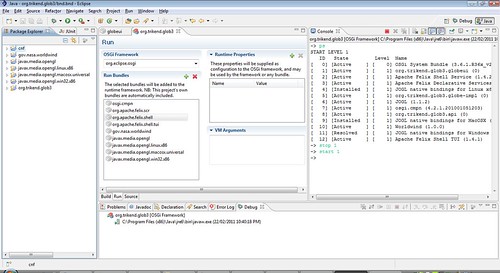
After this all the bundles will be playing happily in the OSGi Framework, things will look something like this:


START LEVEL 1
   ID   State         Level  Name
[   0] [Active     ] [    0] OSGi System Bundle (3.6.1.R36x_v20100806)
[   1] [Active     ] [    1] org.trikend.glob3.globeui (0)
[   2] [Active     ] [    1] Apache Felix Shell Service (1.4.2)
[   3] [Active     ] [    1] Apache Felix Declarative Services (1.4.0)
[   4] [Installed  ] [    1] JOGL native bindings for Linux x86 (1.1.2)
[   5] [Active     ] [    1] org.trikend.glob3.globe-impl (0)
[   6] [Active     ] [    1] JOGL (1.1.2)
[   7] [Active     ] [    1] osgi.cmpn (4.2.1.201001051203)
[   8] [Active     ] [    1] org.trikend.glob3.api (0)
[   9] [Installed  ] [    1] JOGL native bindings for MacOSX (1.1.2)
[  10] [Active     ] [    1] Worldwind (1.0.0)
[  11] [Resolved   ] [    1] JOGL native bindings for Windows x86 (1.1.2)
[  12] [Active     ] [    1] Apache Felix Shell TUI (1.4.1)


Here is a screenshot for further clarity (or lack thereof).

worldwind_bndtools_less